File Handling
About
Most Programming Language Contain instructions that allow the program code to access data held in other files this is the basic of File Handling. Without this ability all the data used by a program would have to be stored in the code, entered by the user or received from an external device, what this mean is that you can write an entire essay (exaggeration) and easily transfer it to another file which is more efficient than writing it all in the code and ensures that your data is saved when the program is not running also on a side note that data can be shared with other programs.
Read, Write & Appending
You can determine what these word mean in terms of File Handling,for write pretty much you can write whatever you want and your code/ the programs code transfers it to another file (oh i should say most of the time it usually a text file for the sqa). As you can guess read in terms of F.H (File Handling) means making your code read data from a text file on your computer. Appending is a little different this is what you use if you're adding to a file.
Process
First you set an instruction to open the file ( creating a link with the file), a path to the file (determines where to find the file if it read or save the file if it write) then determine whether it read or write then an instruction to close the file ( breaking the link to the external data).
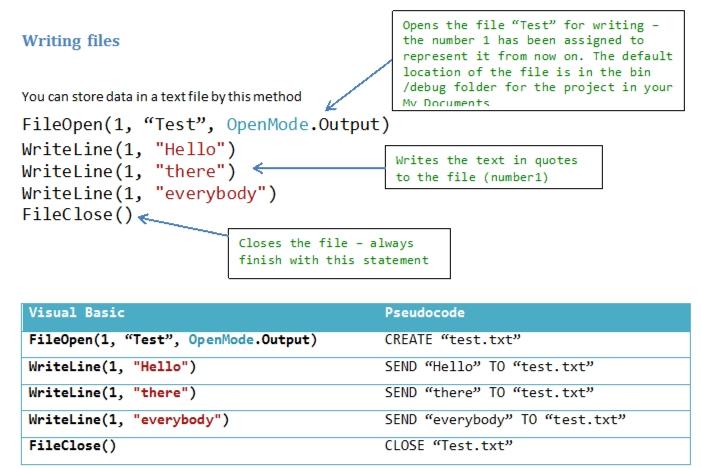
FileOpen(“1”: which is a reference to the file, ”test.txt”: which is the filename and should be followed by the its path, “OpenMode.Output” : which is what user wants to do to the file)
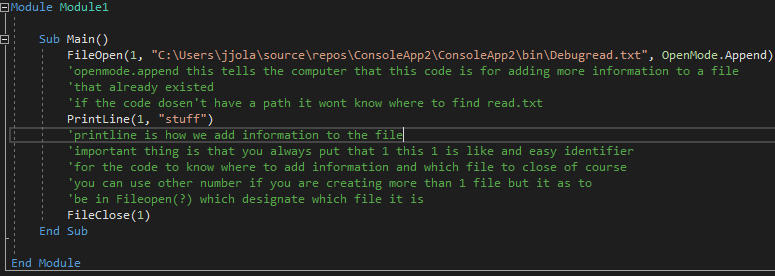
OpenMode options: [Output for writing, Input for reading, Append for adding]
I recommended video alot it will teach you more than what I've written and it easy to Understand
Write example in Visual Basic
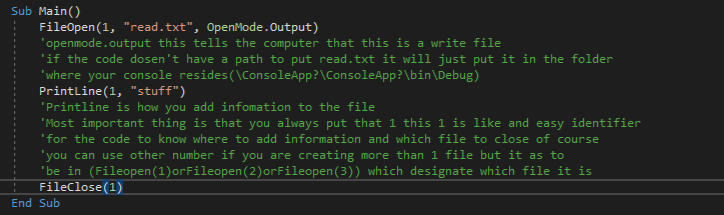
For write make sure that whatever you do you don't have a file that already as the same name as the file you will be creating or else when you run the code the computer will check through all your files and if it find one with the same name it will overwrite the file and all your information that was on the file will be deleted the video on top as more information on this. Also in Visual basic you have to say what type of file it is or else the code will create the file and you wont be able to access it. video for more information.
Read example in Visual Basic
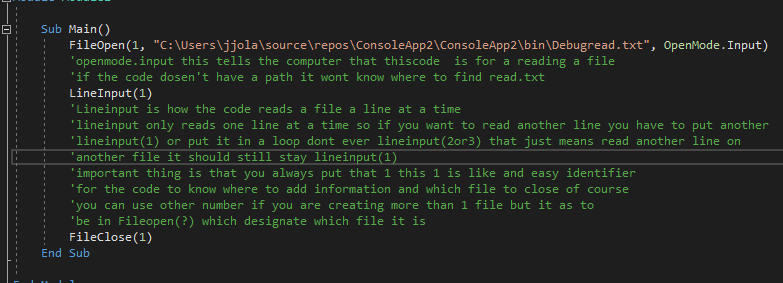
The loop to use for reading file is known as EOF (End Of File) this keep on reading the file until there no more lines to read.
Do While Not EOF(1) : carry out the task as long as it’s isn’t the end of the file.
Appending example in Visual Basic
Questions
A program is required to store five race times (in seconds) entered by a user in plain text file. In a Language you want, write a program that will write the five race times to a file called 'RaceTimes'.
Answer
Pseudocode: OPEN FILE "RaceTimes.txt"(1 mark for opening file)
For counter FROM 1 to 5 (1 mark for unconditional loop)
RECEIVE time FROM (REAL) KEYBOARD (1 mark for user input)
SEND time TO RaceTimes (1 mark for writing to the file)
END FOR
CLOSE FILE "RaceTimes.txt"
Question
Use your knowledge of file handling to examine the following visual basic code and state the name of the file, the type of file and what kind of file it is.
FileOpen(1, question.txt, OpenMode.Output)
Answer
Name of the file: question
Type of file: .txt
Kind of file: write file